Introduction: A Polite Email With a Poisoned Link
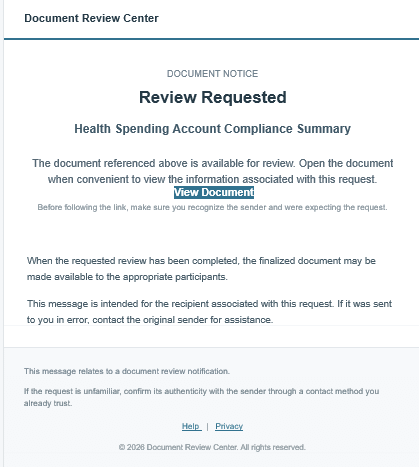
Not every scam announces itself with a million-dollar book deal or a celebrity fan letter. Some arrive wearing the plainest costume available: a quiet, professional-looking notice that a document has been “shared for your review.” This alert dissects one such message. It claims to come from an e-signature service, carries the headline “Review Requested,” refers to a “Health Spending Account Compliance Summary,” and urges the reader to click a button labelled “View Document.”
This is a phishing scam built on a fake document-sharing notice. Its goal is to get you to click a link and then hand over your email password, banking details, or personal information, or to install malicious software on your device. To be clear about what we are looking at: the message itself is generic and is not addressed to authors specifically. We are sharing it because this style of lure is increasingly used against writers, and because the same pattern can be re-skinned in minutes to say “Contract for Review,” “Rights Agreement,” or “Royalty Statement.”
Why authors? Because we live in our inboxes. We receive publisher correspondence, agent queries, contract drafts, cover proofs, review requests, and royalty statements. Many of us work alone, without an IT department or a legal team to ask “is this real?” Scammers know that a document-review notice is exactly what a working author expects to see on any given Tuesday. It is also true that the author community is a proven target, with watchdog groups such as the Authors Guild and Writer Beware reporting a steady rise in fraudulent approaches, many of them now polished with AI-generated text.
Anatomy of the Message
Here is what the message contains, piece by piece:
- The sender: a display name reading “Adobe-Acrobat-Secured-E-Sign” attached to an address at an unrelated domain, net. Adobe does not send from that domain.
- The branding: a header reading “Document Review Center,” a company that does not exist as a recognizable service.
- The hook: “DOCUMENT NOTICE – Review Requested – Health Spending Account Compliance Summary.”
- The call to action: a coloured “View Document” button that leads to za.org, a domain with no connection to Adobe or any document service.
- The reassurance: lines such as “Before following the link, make sure you recognize the sender” and “confirm its authenticity with the sender,” which sound responsible but are there to lower your guard.
- The footer: “Help” and “Privacy” links that point to your-domain.example, template placeholder text the scammer forgot to replace.
The Scammer’s Tactics
Even a short message can carry a full toolkit. Here is how each tactic works here.
Impersonation
The sender name borrows the credibility of Adobe Acrobat and e-signature software, tools authors genuinely use for contracts. The visual design (clean white card, accent-coloured header, tidy footer) copies the look of real notification emails. Impersonation is the foundation of nearly every scam targeting writers, whether the mask is a publisher, an agent, a film studio, or a famous author.
False authority
Words such as “Compliance,” “Secured,” “Review Center,” and “Document Notice” sound official and procedural. Compliance language suggests that ignoring the message could carry consequences. A real organization has a name, a postal address, and a contact person. This one has none of those.
Vague offers
The message never says what the document is for, who wants it reviewed, or why you. “Open the document when convenient to view the information associated with this request” could mean anything. Vagueness is deliberate: it lets every recipient project their own situation onto the message. An author waiting on a contract sees the contract. An author expecting a royalty statement sees that.
Soft urgency
This email does not shout “ACT NOW.” Instead it uses quiet urgency: “Review Requested,” “notice,” and the implied idea that someone is waiting on you. Subtle pressure is harder to recognize than a countdown timer, and it is more effective on busy people.
Flattery and belonging, in author-targeted versions
This sample has no flattery, but variants aimed at writers often add it: “Your manuscript has been shortlisted,” “Your publisher has shared your contract.” Praise and insider status make the click feel like an honour rather than a risk.
False reassurance
The advice to “make sure you recognize the sender” is a trust-building device. By appearing to warn you, the message positions itself as the careful, honest party. Genuine security teams do not need to say this inside the message because the sender and link already check out.
Why the Offer Is Fraudulent
A genuine document notification has a traceable chain: a named sender, an organization you know, a document you were told to expect, and a link that leads to the real company’s website. This message fails every link in that chain.
- The sender and the service do not match. A legitimate Adobe notice comes from Adobe’s own domains, not from an unrelated address.
- The link goes to the wrong place. A button labelled “View Document” that opens an unrelated website is the clearest evidence of fraud. The real destination is most likely a fake login page built to capture your credentials, or a file download carrying malware.
- The document cannot exist. Nobody can legitimately ask you to review a “Health Spending Account Compliance Summary” without a prior relationship, an employer or benefits administrator you recognize, and a reference to your plan. There is no such document waiting for you.
- The template is unfinished. Footer links to “your-domain.example” show the email was produced from a reusable kit, not by a company with a real help desk or privacy policy.
Compare this with an illustrative author-targeted variant (a hypothetical example, not a message from our files): “Your publisher has shared your Rights Agreement for signature.” If you have no publisher, or your publisher never uses that platform, the offer is impossible. A contract cannot be waiting for you from a company you have never dealt with.
The Psychology Behind the Wording
Scam copy is rarely clumsy by accident. Each phrase is chosen to get past your analytical mind and trigger a habitual response.
- Authority bias. We defer to anything that sounds official. “Compliance,” “Secured,” and “Notice” suggest rules and consequences.
- Curiosity gap. “Review Requested” without any detail creates an itch. The only way to scratch it is to click.
- Routine and habit. Document-sharing emails are everyday events. The more ordinary the request, the less scrutiny it receives. Fraudsters aim for the “I get these all the time” reflex.
- Reciprocity and obligation. “Review Requested” implies that someone has already done something for you and is waiting on your reply. Most of us dislike leaving people waiting.
- Trust transfer. The cautionary lines about recognizing the sender borrow the voice of a safety notice. A message that appears to warn you feels safer than one that does not.
- Cognitive overload. Authors juggling deadlines, launches, and day jobs process mail quickly. Scammers are counting on that fatigue.
In author-targeted scams the emotional levers are stronger. Writers invest years in a book and often feel isolated and unsure about marketing and contracts. A message that offers recognition, representation, or a contract touches hope, which is why it can briefly override normal caution.
How This Fits Broader Industry Patterns
This email is a cousin of a much larger family. Watchdogs including Writer Beware and the Authors Guild have documented schemes that impersonate publishers, agents, film studios, book clubs, reviewers, and famous authors. Their typical shape is the same: unsolicited contact, a desirable promise, and eventually a request for money, personal information, or access.
- Fee-first publishing and marketing offers. Legitimate publishers and agents do not charge to read your manuscript, yet fake ones ask for “processing,” “printing,” or “registration” fees.
- Fake book clubs and review services. Gushing praise is followed by an “engagement fee” or reviewer “tip.”
- Film and TV adaptation approaches. A supposed producer shows interest, then asks for a rights or review fee.
- Impersonation of well-known authors or agents. The scammer borrows a famous name to gain trust.
- AI-polished outreach. Generative tools make it easy to quote your plot or your reviews back to you, so personal praise no longer proves that anyone read your book.
- Slow-burn approaches. Some scammers exchange several friendly messages before money is ever mentioned.
The document-review phish is the technical wing of the same trade. Instead of persuading you to pay a fee, it persuades you to hand over the keys: your email login, which in turn unlocks your author website, retailer dashboards, and social accounts.
Red Flags Authors Should Watch For
- A sender name that does not match the actual email domain.
- A link whose destination differs from the company named in the message (hover over it to check).
- An unexpected document, contract, or “review” from someone you have never dealt with.
- No recipient name, no sender name, no reference number, and no real contact details.
- Placeholder or broken footer links, or a missing postal address.
- Official-sounding but empty language such as “compliance,” “secured,” or “notice.”
- Pressure to act quickly, or a reassuring line that tells you to trust the message.
- Any request for payment, a password, or personal data before you have verified who is asking.
- Praise or opportunities you did not seek, especially if the compliments are generic.
How Authors Can Protect Themselves
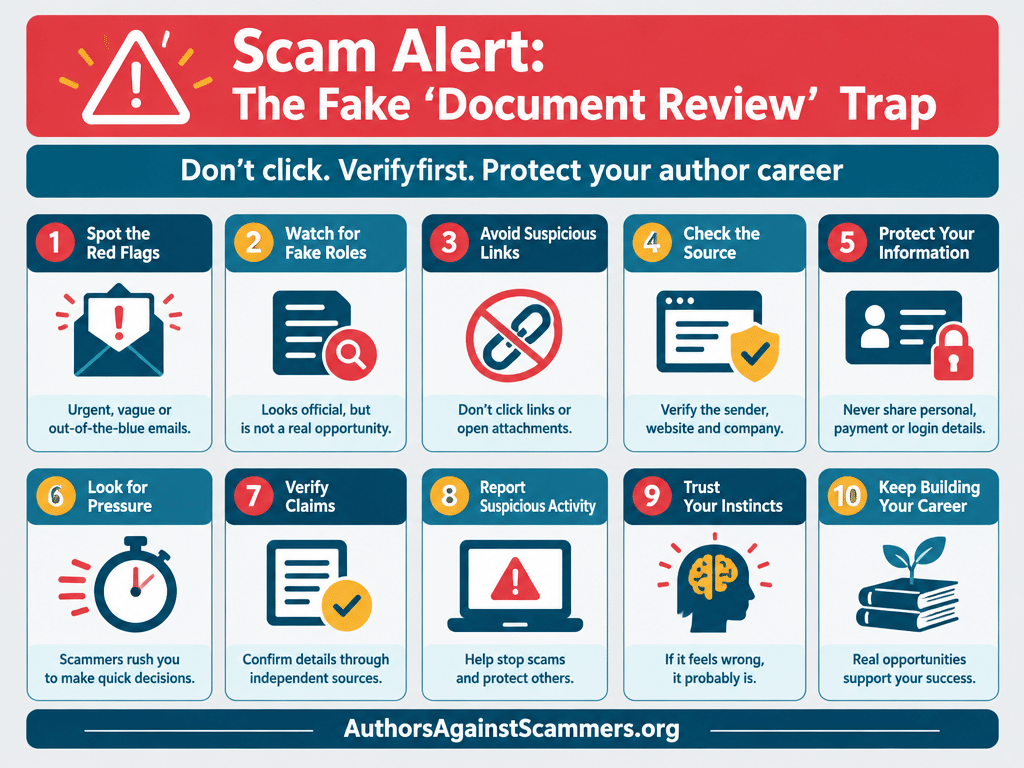
- Pause before you click. Treat every unexpected attachment or link as untrusted until verified.
- Check the real destination. Hover over links, compare the domain to the company’s known website, and never rely on button labels.
- Verify independently. If a message claims to be from your publisher, agent, or an e-signature service, contact them using details you already hold, not the ones in the email.
- Go to the source. Open the official website or app yourself rather than following a link.
- Search the name. Look up the sender and organization with the word “scam” or “complaints,” and check watchdog resources such as Writer Beware and the Authors Guild’s scam alerts.
- Never pay to be published, represented, or reviewed. Legitimate agents and traditional publishers do not charge reading fees.
- Secure your accounts. Use unique passwords, a password manager, and multi-factor authentication on your email and retailer accounts.
- Ask a second pair of eyes. Share the message with a writing group or trusted colleague before acting.
- If you clicked, change your passwords immediately from a clean device, enable multi-factor authentication, check for forwarding rules in your email, and tell your email provider or IT contact.
Call to Action: Report It, Share It
Scammers rely on silence. Each author who deletes a scam message without reporting it leaves the next recipient unprotected. If you receive a message like this one, take two minutes to help others:
- Report it as phishing in your email program, then delete it.
- Forward suspicious author-targeted messages to the organizations that track them, such as the Authors Guild (scams@authorsguild.org) or Writer Beware.
- Share the sender address, the link domain, and the wording with AuthorsAgainstScammers.org so we can warn others. Please do not click the link to “test” it.
- Tell your writing group. A single warning in a forum or newsletter can prevent several victims.
Being cautious does not make you cynical. It makes you a professional. Verify first, and you will protect your work, your income, and your community.
Forensic Analysis:
| Field Name | Expanded Value |
| Scam Confidence | 95-99% likelihood of phishing scam. The sender domain (habersimetob.net) has no link to Adobe, the “View Document” button goes to an unrelated domain (lydenburg.za.org), and the footer links are template placeholders (your-domain.example). The generic wording has no names or reference numbers. |
| Threat Type | Phishing / fake document-sharing notice (fake e-signature or “document review” email). Primary goal: credential harvesting (email password, banking or personal details). Secondary risk: malware download. Searchable terms: fake Adobe Acrobat Sign email, document review phishing scam, shared for your review scam. |
| Target Audience | Authors and self-published writers who expect contracts, royalty statements and publisher mail. The sample is generic, so it can also hit small-business owners, freelancers and anyone with an email account. Variants can be re-skinned as “Contract for Review,” “Rights Agreement” or “Royalty Statement.” |
| Key Red Flags |
1. Sender mismatch: “Adobe-Acrobat-Secured-E-Sign” sent from habersimetob.net. 2. Wrong link destination: “View Document” leads to lydenburg.za.org. 3. Placeholder footer links: Help and Privacy point to your-domain.example. 4. Generic content: no recipient name, sender name or reference number. 5. Unexpected document: “Health Spending Account Compliance Summary” with no prior relationship. 6. Soft urgency and false authority: “Review Requested,” “Compliance,” “Secured.” 7. Reassurance trick: “make sure you recognize the sender” is meant to lower your guard.
|
| Recommended Actions |
1. Do not click the link, download anything or reply. 2. Report as phishing in your email program, then delete it. 3. Report it to ReportFraud.ftc.gov (US) or the Canadian Anti-Fraud Centre and RCMP reporting system (Canada). 4. Forward author-targeted scams to scams@authorsguild.org (Authors Guild). 5. Secure your accounts with unique passwords and multi-factor authentication. 6. If you clicked, change passwords from a clean device and check email forwarding rules. See the FTC phishing guidance.
|
| Related Scams |
1. Fake publisher employee scam: an author paid more than $14,000 in “printing” fees to a fake Hachette employee (Authors Guild). 2. PageTurner Press impersonation: an elderly author was reportedly defrauded of $800,000 (Authors Guild). 3. Fake film adaptation offers: an author paid thousands of dollars in fees (Authors Guild). 4. AI-enhanced email scams and author impersonation via contact forms (Authors Guild alerts). 5. Party-invite credential phishing, which asks for an email address and password to open an invite (FTC Consumer Alerts).
|
| Sender Details | Display name: “Adobe-Acrobat-Secured-E-Sign.” Address: acrobat_document_cloud@habersimetob.net. Phone: none given. Signature: “Document Review Center,” an unrecognizable organization with no postal address or contact person. Affiliation analysis: the name borrows Adobe Acrobat credibility, but the domain is unrelated. The footer reads “© 2026 Document Review Center.” The domain and link registration have not been independently verified. Do not visit them to check. |
| Additional Context | The message uses a clean white card layout with an accent-colored header that copies real notification emails. It never says what the document is, who sent it or why you. The safety lines (“confirm its authenticity with the sender”) are a trust-building device. Watchdogs report that AI-written scam emails are making author-targeted scams more believable (Authors Guild). Scammers can re-skin the template in minutes. |
| Book/Product Targeted | No specific book is named. The lure is a “Health Spending Account Compliance Summary” document. Author-targeted variants may reference contracts, rights agreements or royalty statements. |
| Fake Website | lydenburg.za.org (the “View Document” destination). Verification status: unverified and unsafe. The domain does not match Adobe or any document service. Do not open it. Treat it as a likely credential-harvesting page or malware download. |
| Reported Losses | No losses are documented for this specific email. For author-targeted scams, the Authors Guild reports individual cases of $14,000 and $800,000 (Authors Guild). The Canadian Anti-Fraud Centre reports $535 million lost to all fraud in Canada as of September 30, 2026 (CAFC). |
| Geographic Focus | Global, with likely reach into US, Canada and UK author communities. The Society of Authors and the Writers’ Guild of Great Britain have also reported a surge in author-targeted scams (WGGB guide). |
| Footnotes/Sources |
1. FTC: How To Recognize and Avoid Phishing Scams 3. Authors Guild: Publishing Scam Alerts 4. Authors Guild: Avoiding Publishing Scams 5. Writers’ Guild of Great Britain: How to protect against scammers
|

Rae Stonehouse is a Canadian author, publisher, and advocate committed to exposing publishing scams and supporting writers through education and community. As the creator of Authors Against Scammers, Rae provides clear, practical guidance to help writers protect their work, their money, and their peace of mind. His books and resources reflect a lifelong dedication to empowering others through knowledge, clarity, and real‑world experience.