Summary
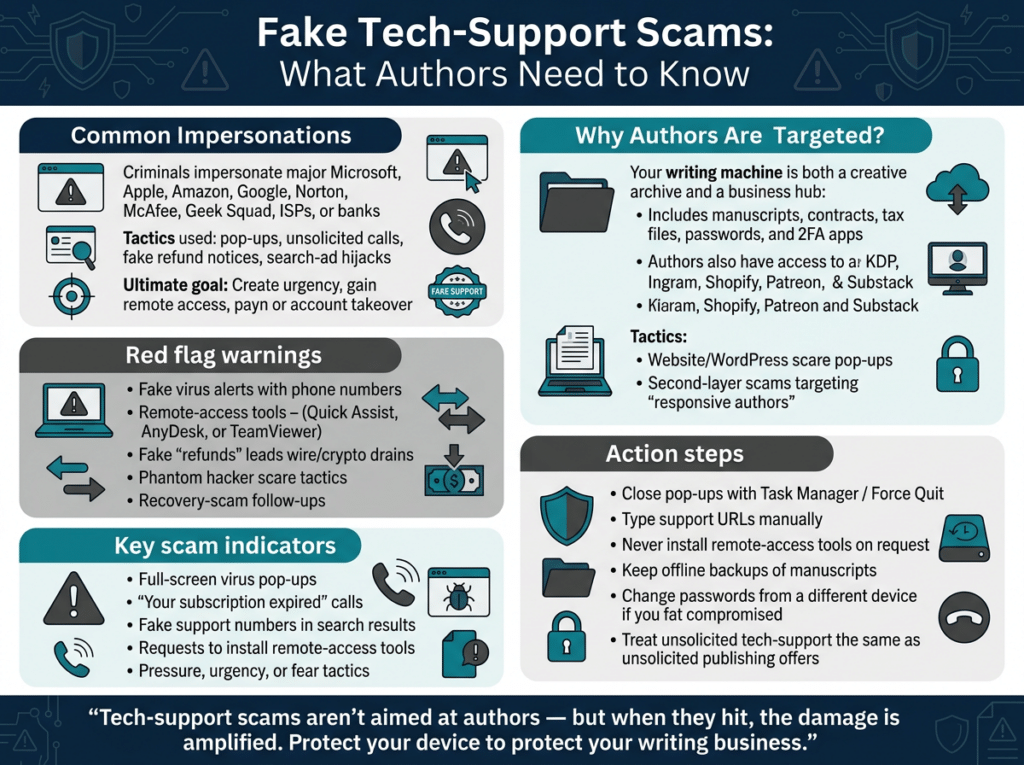
Fake tech support scams impersonate trusted technology brands to trick victims into granting remote access and making payments. While these scams do not specifically target authors, they pose amplified risks because an author’s computer typically holds manuscripts, contracts, financial accounts, and publishing platforms. This overview explains common tactics, author-specific impacts, and practical defenses.
Scam Type
Impersonation / Fake Tech Support (including remote access fraud and follow-on recovery scams)
Incident Description
Not provided. This material is a general educational overview of fake tech support scams rather than a report of one specific incident.
Evidence / Excerpts
- “The FBI reported U.S. losses around $1.4–$1.5 billion in 2024, with some 2025 summaries estimating even higher.”
- “Legitimate companies do not cold call you about viruses, demand remote access from a pop up, or ask for passcodes or 2FA codes to ‘unlock’ support.”
- “There is no documented wave of tech support scams aimed only at writers.”
- Typical openers listed: fullscreen browser popups with a phone number, unsolicited calls/texts, search-ad hijacks, and fake security-scan sites.
- Universal script steps: urgency, remote-access software (Quick Assist, AnyDesk, TeamViewer), payment, “phantom hacker” money-move request, and later recovery-scam calls.
Red Flags
- Unsolicited contact (popup, call, text, or search-ad phone number) claiming a virus, license issue, or compromised account.
- Demand for immediate remote access via Quick Assist, AnyDesk, or TeamViewer.
- Requests for payment, gift cards, wire transfers, or cryptocurrency.
- Claims that “hackers” are already inside accounts and that money must be moved to a “safe” account.
- Follow-up calls from supposed “recovery specialists.”
- Any request for 2FA codes, passwords, or hosting credentials.
Scammer Method & Tactics
Fraudsters impersonate Microsoft, Apple, Amazon, Google, Norton/McAfee, Geek Squad, ISPs, or bank security teams. They create urgency, install remote-access tools, extract payment, and sometimes escalate to account-takeover or a second-layer recovery scam. AI voice clones and look-alike ads have made the initial contact more convincing.
Risk Level
High (large documented financial losses nationwide; catastrophic potential for authors because creative work, contracts, and income streams reside on the same device)
Recommended Action for Authors
- Close any popup immediately (Task Manager on Windows or Force Quit on Mac); never call the displayed number.
- Manually type the official company URL or use the in-app Help menu.
- Never install remote-access software at a stranger’s request.
- Keep writing/admin work on a separate machine from everyday browsing when possible; maintain offline backups of manuscripts.
- If access has already been granted: disconnect from the internet, change passwords from a different device, enable 2FA, contact the bank, and report to IC3.gov and the FTC.
- Treat any unsolicited “tech support” or “KDP/website problem” contact the same way as unsolicited publishing offers: hang up and verify independently.
Status
Active
Source: https://authorsagainstscammers.org/2026/08/28/fake-tech-support-scams-and-why-authors-should-still-be-paying-attention/
Forensic Scam Profile
Scam Confidence
95-99% likelihood these represent authentic, high-volume fraud operations. Assessment: FBI IC3 documented $1.46 billion in 2024 U.S. losses from tech support scams (36,002 complaints), with FTC confirming hundreds of millions more via pop-up and inbound-call schemes targeting seniors and professionals. Tactics (brand impersonation, remote access, urgency) match official warnings from Microsoft, FTC, and IC3 exactly; AI voice clones and search-ad hijacks represent documented evolution, not speculation.
Threat Type
Fake Tech Support Scams (primary: Microsoft/Apple/Amazon/Norton/Geek Squad impersonation + remote-access fraud). Sub-types include popup virus alerts, unsolicited calls, search-ad hijacks, phantom-hacker displays, and layered recovery scams.
Target Audience
Self-published authors and writers (home-office machines hold manuscripts, KDP/IngramSpark/royalty dashboards, contracts); seniors 60+ (5x more likely per FTC, $175M+ losses); general computer users, small-business owners, anyone searching for “Microsoft support” or clicking pop-ups. Authors uniquely exposed because creative archive = business infrastructure.
Key Red Flags
1. Fullscreen browser pop-ups claiming virus, Windows Defender alert, or license expiration with a phone number (real Microsoft never does this). 2. Unsolicited calls/texts impersonating Microsoft, Apple, Amazon, Norton, Geek Squad, ISP, or “your bank’s security team.” 3. Extreme urgency (“compromised right now”). 4. Demand to install remote-access tools (Quick Assist, AnyDesk, TeamViewer). 5. Payment via wire, crypto, gift cards for “cleanup” or fake “refund.” 6. Fake “hackers” shown in your accounts + instructions to move money to “safe” account. 7. Follow-up recovery-scam calls offering to retrieve lost funds.
Recommended Actions
1. Close popup via Task Manager (Windows) or Force Quit (Mac)—never call the number. 2. Manually type official company URL or use in-app Help; ignore search-ad numbers. 3. Never install remote-access software at a stranger’s request. 4. Keep writing/admin machine separate from browsing; maintain offsite manuscript backups. 5. If access already given: disconnect internet, change all passwords from a different device, enable 2FA, contact bank immediately, report to IC3.gov and ReportFraud.ftc.gov. 6. Treat unsolicited tech support exactly like unsolicited publishing offers—hang up and verify independently.
Related Scams
1. AI-personalized publishing/marketing scams targeting authors (fake agents, publishers, book-to-film deals; FBI $44M elderly-author case). 2. Recovery/revictimization scams (second crew calls after initial loss, impersonating IC3/FBI). 3. Phantom-hacker / government-impersonation variants (FBI IC3). 4. Search-ad hijacks embedding fake numbers on real Netflix/Apple/Microsoft pages. 5. Geek Squad/Best Buy impersonation (FTC’s most-reported brand). All share remote-access + payment-drain mechanics.
Sender Details
No single sender—operations use spoofed caller IDs, fake pop-up domains, and paid Google ads. Impersonate official support (Microsoft, Apple, etc.) with no real affiliation or verifiable signature. Calls often originate from overseas call centers; emails/texts use lookalike branding. Legitimate companies never cold-call about viruses or request 2FA/passcodes.
Additional Context
Authors suffer amplified damage: remote access steals drafts, contracts, password managers, KDP/Shopify/Patreon logins, and can lock entire platforms. Website “hacked—call this number” pop-ups lead to hosting-credential theft, defacement, or malware. Victims often added to “responsive author” lists for follow-on publishing scams. 2024 U.S. losses $1.46 billion (FBI); seniors $175M+ (FTC). Emerging: AI voice clones posing as Apple Support, fake Microsoft Teams IT pop-ups. Core ask remains access + money.
Book/Product Targeted
Reported Losses
$1.46 billion (FBI IC3 2024, 36,002 complaints); $175 million+ among consumers 60+ (FTC 2024). Average per-victim often $10K–$50K once bank/remote access involved; some lose life savings via phantom-hacker money-movement.
Geographic Focus
Primarily United States (highest reported losses), with global operations (India-based call centers common). Complaints also from Canada, UK, Australia; victims in 70+ countries historically.
Footnotes / Sources
1. FBI IC3 2024 Internet Crime Report: https://www.ic3.gov/AnnualReport/Reports/2024_IC3Report.pdf ($1.46B tech-support losses). 2. FTC “How to Spot, Avoid, and Report Tech Support Scams”: https://consumer.ftc.gov/articles/how-spot-avoid-and-report-tech-support-scams. 3. FTC TSR Amendment Press Release (Nov 2024): https://www.ftc.gov/news-events/news/press-releases/2024/11/ftc-takes-aim-top-fraud-driving-losses-among-older-americans. 4. Microsoft Official Guidance: https://support.microsoft.com/en-us/windows/protect-yourself-from-tech-support-scams-2ebf91bd-f94c-2a8a-e541-f5c800d18435. 5. FBI Tech Support Scams Page: https://www.fbi.gov/how-we-can-help-you/common-frauds-and-scams/tech-support-scams. 6. IC3 PSA “Increase in Tech Support Scams Targeting Older Adults”: https://ic3.gov/PSA/2023/PSA230718. 7. Axios FBI 2024 Report Summary: https://www.axios.com/2025/04/23/fbi-internet-crime-loss-record-high-2024.
Rae Stonehouse is a Canadian author, publisher, and advocate committed to exposing publishing scams and supporting writers through education and community. As the creator of Authors Against Scammers, Rae provides clear, practical guidance to help writers protect their work, their money, and their peace of mind. His books and resources reflect a lifelong dedication to empowering others through knowledge, clarity, and real‑world experience.